



How To Use Bluetooth Device To Link To Mazda Cars
Connecting your phone to your Mazda through Bluetooth only takes a few minutes. Once it’s paired, you can use the connection for hands-free calls, music, podcasts, and other compatible features without setting it up again every time you drive.
The exact menu names can vary a little by Mazda model and version of Mazda Connect, but the basic process is very similar.
How to Pair Your Phone With Mazda Bluetooth
Before you start, park somewhere safe and make sure Bluetooth is turned on on your phone.
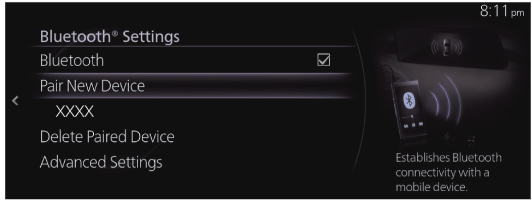
Then:
- Open the Bluetooth or connectivity settings in Mazda Connect.
- Select the option to add or pair a new device.
- Open the Bluetooth settings on your phone.
- Find your Mazda in the list of available devices.
- Select it and make sure the pairing code on your phone matches the code on the Mazda Connect screen.
- Confirm the connection on both devices.
- Allow access to contacts, call history, or other permissions if you want to use those features.
Once everything is connected, your phone should appear in the saved device list.
What Can You Use Mazda Bluetooth For?
Once your phone is paired, you can typically use Bluetooth for:
- Hands-free phone calls
- Music and podcast streaming
- Access to contacts
- Call history
- Compatible audio controls through Mazda Connect
- Steering-wheel audio and calling controls
Some features require permission from your phone, so if contacts or call history aren’t showing up, check the permissions for the Bluetooth connection.
How to Play Music Through Mazda Bluetooth
If your phone is already paired but you want to stream audio:
- Make sure your phone is connected through Bluetooth.
- Select Bluetooth Audio as the source in Mazda Connect.
- Start playing music, a podcast, or another audio source from your phone.
If you don’t hear anything, make sure the correct phone is selected and Bluetooth Audio is the active source.
Will Your Phone Connect Automatically Next Time?
Usually, yes.
Once you’ve paired a phone, Mazda Connect can normally reconnect to it when you get back into the vehicle, as long as Bluetooth is turned on and the phone is available.
If you have several phones saved, the system may connect to a different device first. You can switch to the phone you want from the Bluetooth device list.
It can also help to remove old phones you no longer use.
Can You Pair More Than One Phone?
Yes, many Mazda Connect systems can save more than one Bluetooth device.
That’s useful if more than one person regularly drives the vehicle.
The number of devices that can be stored or connected at once can vary, so if the wrong phone keeps connecting, open your Bluetooth settings and select the one you want to use.
How Do You Use Bluetooth Calling?
Once your phone is paired, compatible Mazda Connect systems can also handle hands-free calling.
If calling is the part you’re having trouble with, we put together a separate guide that walks through it in more detail:
What If Your Mazda Bluetooth Won’t Connect?
If your phone isn’t showing up, won’t stay connected, or suddenly stopped working, start with a few simple checks.
Make sure:
- Bluetooth is turned on on your phone
- The correct device is selected in Mazda Connect
- Your phone isn’t already connected to another nearby device
- The phone and vehicle still have the pairing saved
Turning Bluetooth off and back on or restarting your phone can sometimes solve a temporary connection issue.
If the problem keeps happening, removing the pairing and setting it up again is a good next step.
For more help, see our Mazda Bluetooth troubleshooting guide.
Mazda Bluetooth FAQs
How do I connect my iPhone to Mazda Bluetooth?
Turn Bluetooth on in your iPhone settings, open the Bluetooth or connectivity menu in Mazda Connect, and choose the option to add a new device.
Select your Mazda from the list on your phone and confirm that the pairing code matches on both screens.
How do I connect an Android phone to Mazda Bluetooth?
Turn on Bluetooth on your Android phone, open the Bluetooth settings in Mazda Connect, and start pairing a new device.
Select your Mazda from the available devices on your phone and approve the connection.
Why isn’t my phone showing up?
Make sure Bluetooth is turned on and your phone is available for pairing.
If the phone has been connected before, an old saved connection may also be causing trouble. Our Mazda Bluetooth troubleshooting guide has more steps to try.
Can I listen to music through Mazda Bluetooth?
Yes. Once your phone is paired, select Bluetooth Audio as the source in Mazda Connect and start playing audio from your phone.
Can I make calls through Mazda Bluetooth?
Yes, compatible systems support hands-free Bluetooth calling. If you need help setting it up, see our guide to Bluetooth calling in your Mazda.
Why does a different phone keep connecting?
If several phones are paired, the system may connect to another available device first.
Open the paired-device list in Mazda Connect and select the phone you want to use.
Do I need to pair my phone every time I drive?
Usually not. Once the phone is paired, it should reconnect automatically when Bluetooth is turned on and the device is nearby.
Still Having Trouble With Mazda Connect?
For most drivers, Bluetooth setup is a one-time job.
If you’re having trouble with a specific feature, these guides can help:
If the problem keeps coming back, our team in Sheffield Village can help determine whether the issue is coming from the phone, the connection, or the vehicle’s infotainment system.
Bluetooth menus and available features can vary by Mazda model, model year, phone, and Mazda Connect system.

0 comment(s) so far on How To Use Bluetooth Device To Link To Mazda Cars